Homelab
This page reflects the active state of my local infrastructure, virtualization, and reverse-proxy routing. See the archives for deployment history.
Changelog
- 2026-02-24: Migrated primary node to Lenovo M720q running Proxmox VE. Added desktop node for local LLM inference. Transitioned ingress to Cloudflare Tunnels.
- 2026-02-10: Added Matrix Synapse and Element.
- 2025-09-15: Added Vaultwarden for secrets management.
- 2025-07-04: Migrated to NixOS on HP EliteBook. Added Navidrome, slskd, and Actual Budget.
- 2024-12-12: Initial deployment on Debian Minimal. Setup Jellyfin, Immich, Filebrowser, and Obsidian LiveSync.
Todo:
- Deploy SSO portal (Authentik?) to secure public-facing services.
Current Architecture (Active)
- Hypervisor: Proxmox VE
- Orchestration: LXC Containers & Docker Compose
- Ingress: Cloudflare Tunnels (External) / Tailscale (Internal)
Hardware
- Node 1 (Compute): Lenovo ThinkCentre M720q
- Specs: 16GB DDR4, 512GB NVMe.
- Acceleration: Intel QuickSync (iGPU passthrough for media transcoding and machine learning).
- Node 2 (LLM/AI Host): aorus
- Specs: Ryzen 5 3600, 16GB DDR4, 1TB NVMe, RTX 2060 Super (8GB VRAM).
Active Services
- Media & Streaming: Jellyfin, Navidrome.
- Data & Storage: Immich (Photo backup), Filebrowser.
- Security & Management: Vaultwarden (Secrets), Uptime Kuma (Monitoring).
- Productivity: Baikal (CalDAV/CardDAV), Actual Budget (Finance).
External Access
More details on implementation, threat modelling, and defense on this blog post.
Architecture Archives
[2025-07-04] Bare-Metal NixOS Era
Prior infrastructure relying on a repurposed laptop and declarative OS configuration.
Hardware
- Node: Repurposed HP EliteBook 840 G5 (Battery removed for continuous AC power safety).
- Specs: Intel Core i5-8350U 1.7GHz, 8GB DDR4, 1TB Samsung NVMe SSD.
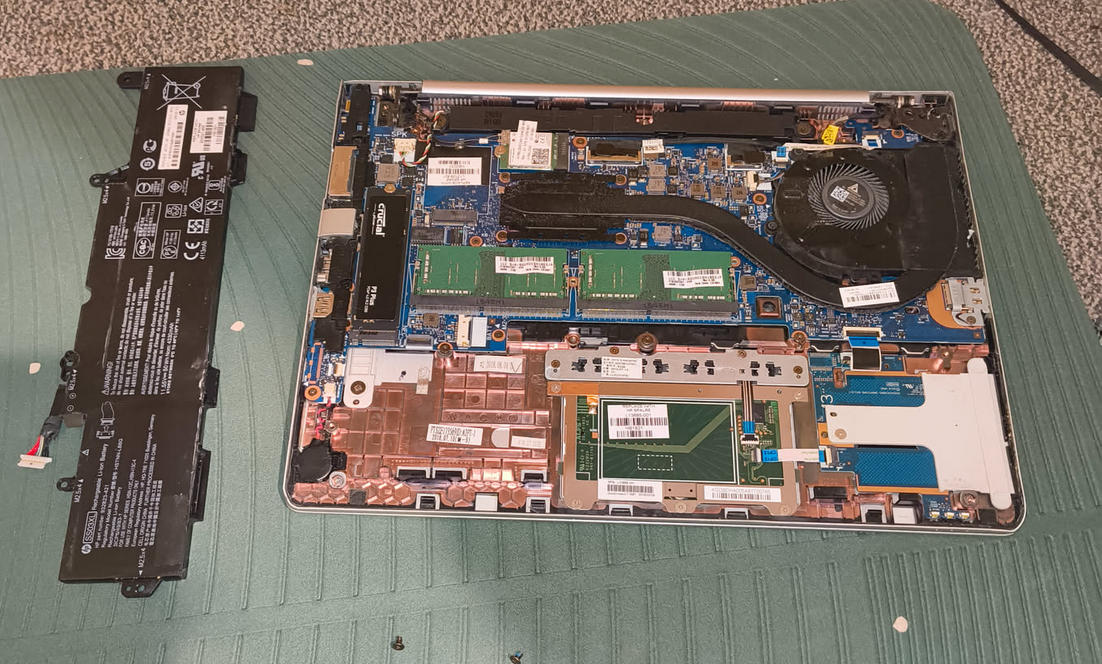
Infrastructure My homelab infrastructure relied on NixOS for the base operating system configuration and Docker Compose for service orchestration.
Why NixOS? I chose NixOS over traditional distros like Debian or hypervisors like Proxmox for several reasons:
- Declarative vs. Imperative: Unlike Debian, where the system state is a result of a sequential list of commands, NixOS is defined by a single file. Migrating to a new machine required only copying
configuration.nixand runningnixos-install. - Resource Efficiency: On an 8GB RAM laptop, running a full hypervisor adds unnecessary overhead. Running NixOS on bare metal ensured maximum compute allocation for heavier services such as Jellyfin.
- Rollbacks: Booting into previous generations from the GRUB menu made it safe to instantly undo breaking system updates.
Service Orchestration
All applications ran as containers defined in a single docker-compose.yml file. External access was managed via Cloudflare Tunnel to avoid exposing the local residential IP.